由于微信公众号开发需要设置IP白名单,而开发环境没有固定的出口IP,导致需要经常到微信公众平台修改设置。
所以设置一个固定IP的代理服务器。
之前在windows用过proxy类软件,但不想在服务器上使用windows系统,所以装了centos。
搜了一下这类软件还挺多,选了一个叫squid的。
直接yum安装: yum install squid
它的配置文件在/etc/squid/squid.conf
我修改了这样几项:
auth_param basic program /usr/lib64/squid/basic_ncsa_auth /etc/squid/passwd
auth_param basic children 5     # 最多 5 个账户同时运行
auth_param basic credentialsttl 2 hours   # 认证持续时间
auth_param basic worren wang's proxy
acl proxy proxy_auth REQUIRED     # 对 user 进行外部认证
http_access allow proxy      # user 用户要和上面的用户一致
http_port 8888  #HTTP连接端口
/etc/squid/passwd 是使用Http的htpasswd创建的验证文件
启动服务:systemctl start squid
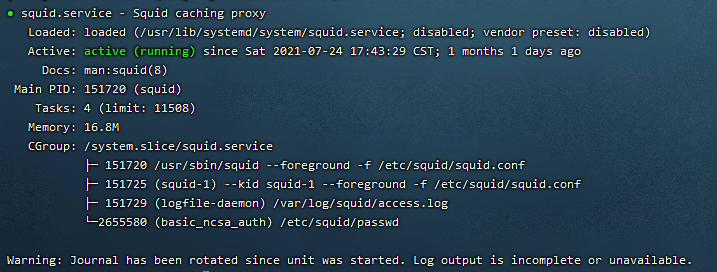
设置开机启动:systemctl enable squid
然后就可以代理http://proxy:[密码]@[服务器IP]:8888访问了
此时微信公众平台就可以设置固定的IP了